What Does Scratch Mean? Full Guide to Visual Coding for Kids
Coding Education9 min read
Coding Education
Maya Putri
Early Childhood Education Specialist
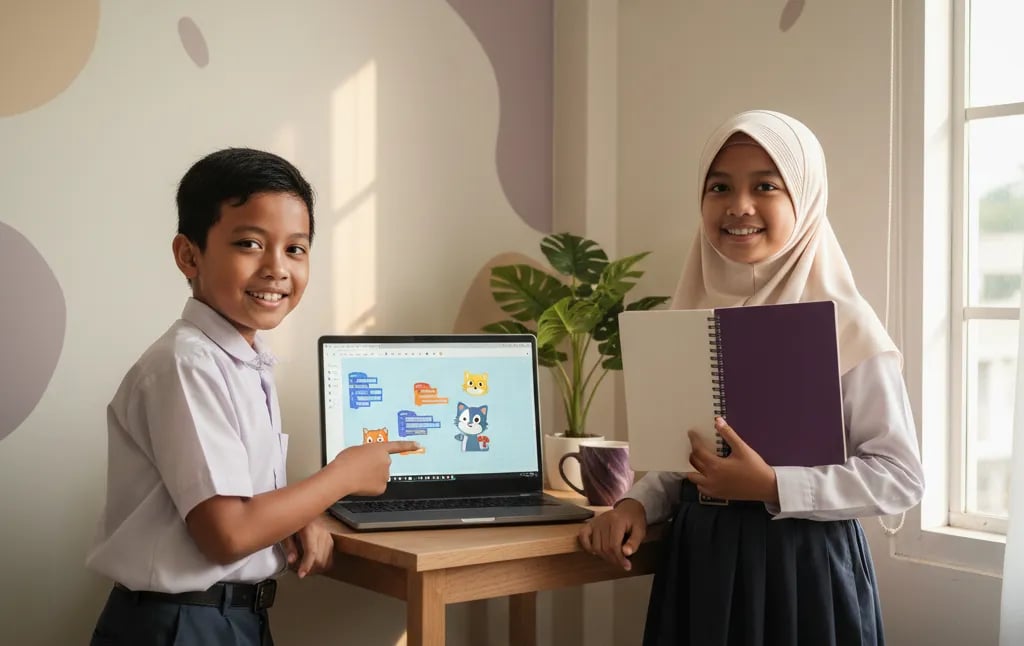
The Scratch project ideas that suit primary school kids best start small: an animated greeting card or an interactive story takes 30 to 60 minutes, and then kids move up to a maze game, a catch game and a platformer. The twelve projects below are arranged for children aged 9 to 12, from beginner to challenge level, with the blocks used, the time needed and the coding concept each one teaches.
Scratch is a block-based visual programming language built by the Lifelong Kindergarten Group at the MIT Media Lab, led by Mitchel Resnick, and released to the public in 2007. Scratch is free, runs in the browser at scratch.mit.edu, is available in more than 70 languages, and is designed for ages 8 to 16. For children aged 5 to 7 there's ScratchJr. Its community has shared more than 100 million projects.
Algonova teaches Scratch in live classes with a teacher, in groups of up to 10 children, from Rp 102,000 per session. More than 1,000,000 students in 97 countries have learned with us, and parents rate us 4.9.
Kids understand coding faster when they build something they care about than when they memorise what each block does.
Mitchel Resnick calls this the creative learning spiral: a child imagines an idea, creates it, plays with it, shares it, and reflects on the result before starting the next idea. One small project already goes all the way round.
A Scratch project is a single file containing sprites (characters), backdrops, sounds and block scripts that run when the green flag is clicked. Because the result shows up straight away, a child can see for themselves when the program works and when there's a bug. If your child is new to Scratch, start with what is Scratch.
| Level | Age | Time per project | Focus |
|---|---|---|---|
| Beginner | 8 to 9 | 30 to 60 minutes | Sequence and events |
| Intermediate | 9 to 11 | 60 to 90 minutes | Conditions and variables |
| Challenge | 10 to 12 | 1 to 4 hours, split across sessions | Clones, gravity, nested loops |
These four projects suit the first week: results show up fast and they only use basic blocks.
Your child makes an Eid or birthday card. A character walks in, says hello, and the backdrop changes to music.
when green flag clicked, glide, say, switch costume, play soundTwo characters talk, and the viewer picks where the story goes by clicking one of the buttons.
say for 2 seconds, wait, broadcast, when I receive, switch backdropEach letter of your child's name becomes a sprite that spins, changes colour or grows when clicked.
when this sprite clicked, repeat, turn, change color effectKeyboard keys play different notes using the Music extension.
when key pressed, play note, set instrument
Step-by-step instructions for animations are in our guide on how to make an animation in Scratch.
A child who finishes one small project usually learns more than a child who watches ten tutorials. The first bug they fix on their own is the real coding lesson.
Maya Putri, Child Education Specialist
Once your child understands events and loops, it's time to build simple games with a score, a way to win and a way to lose.
The player steers a character through corridors with the arrow keys. Touching a wall sends it back to the start; touching the flag shows a winning message.
when key pressed, change x by, if touching color then, go to x: y:Balls fall from random positions and the player slides a basket to catch them. Every catch adds to the score.
pick random, forever, if touching then, change score by 1A character asks five questions, for example times tables or provincial capitals, then gives a score at the end.
ask and wait, answer, if then else, =, set score to 0An enemy chases the player's character, and the player has to survive for 30 seconds.
point towards, move steps, timer, stop allA step-by-step guide to a simple game is in how to make a game in Scratch. Official video tutorials are also free on the Scratch Ideas page.
Projects at this level take several sessions and combine many concepts at once, so they suit kids aged 10 to 12 who have already finished a few games.
Your child looks after a virtual cat that gets hungrier and more bored over time. Feed and play buttons raise its happiness.
hunger and happiness variables, change by, wait, if < thenA character runs and jumps between platforms, with gravity the child builds themselves.
y speed variable, change y by, if touching then, repeat untilA spaceship shoots meteors that keep coming. Each meteor is a clone of a single sprite.
create clone of, when I start as a clone, delete this cloneA sprite draws colourful spirals and flowers using the Pen extension.
pen down, repeat inside repeat, turn, change pen color
Don't rush into big games. A half-finished platformer frustrates a child, while a finished catch game makes them want to build the next one.
Maya Putri, Child Education Specialist
Almost every Scratch game is built from the same five concepts.
| Concept | What it means | Example project |
|---|---|---|
| Sequence | Commands run from top to bottom | Animated greeting card |
| Events | A script starts when something happens | Mini piano, interactive story |
| Loops | Repeat blocks without copying them | Dancing name, geometric patterns |
| Conditions | If something is true, do this | Maze, quiz |
| Variables | A container for a number or text | Catch-the-ball score, digital pet |
There's more on loops in what is a loop. The same concepts come back in Python, just written in words instead of blocks.
Once your child is comfortable building games with variables and clones, usually from around age 10, they're ready to try Python.
Signs your child is ready: blocks start to feel slow, they want to build bigger programs, or they're curious how real games are made. The full comparison is in Scratch or Python for kids. For guided learning with a teacher, see the Scratch course for kids and the coding program for primary school kids at Algonova.
Want to try it now? Join a free coding class: a 60-minute masterclass where your child builds a first project with a teacher.
Scratch 3.0 projects are saved with the .sb3 extension, a single file that holds all of the project's sprites, backdrops, sounds and scripts. If your child works on scratch.mit.edu with an account, the project saves to the server automatically. To keep a copy on the computer, choose File, then Save to your computer, and the .sb3 file downloads. Older versions use other extensions: Scratch 2.0 uses .sb2 and Scratch 1.4 uses .sb. For example, a 10-year-old finishes a catch-the-ball game on the home laptop and wants to keep working on another laptop. They just save the .sb3 file to a USB stick or Google Drive, then open it with File, Load from your computer. An .sb3 file also opens in the offline Scratch app, so the project stays safe even when the internet drops. Get your child into the habit of clear file names, such as catch-ball-v2.sb3, so old and new versions don't get mixed up.
A Scratch project is a program made in Scratch, containing sprites, backdrops, sounds and block scripts that run when the green flag is clicked. A project can be an animation, a story, a game, a quiz or a piece of music. Each sprite has its own scripts, and sprites can send messages to each other with the broadcast block. A project can be saved as an .sb3 file or shared with the Scratch community so others can play it and look at the code. For example, an Eid greeting card where a character walks in and says hello already counts as a Scratch project, even if it uses only six blocks. Scratch was created by the Lifelong Kindergarten Group at the MIT Media Lab and released in 2007. Its community has shared more than 100 million projects. Scratch 3.0, the current version, was released in January 2019 and runs right in the browser.
An animated greeting card is the easiest Scratch project for beginners, because it needs only about five blocks and takes 30 to 45 minutes. Your child picks a character and a backdrop, then puts together the when green flag clicked, glide, say and play sound blocks. The result moves on screen right away, so your child feels successful from the first session. The dancing name and the mini piano work well as next steps. For example, an 8-year-old makes a birthday card for their mum: a cat walks in, says happy birthday, then the birthday song plays. A project that small already teaches the order of commands. After two or three beginner projects, most kids are ready to try a maze or a catch-the-ball game. The key is to let your child pick the theme, because a project about something they love is more likely to get finished.
A simple Scratch project takes 30 to 60 minutes, an intermediate game 60 to 90 minutes, and a challenge project like a platformer 2 to 4 hours. The time depends heavily on your child's experience and how big the idea is. Challenge projects are best split into several sessions, for example one session for moving the character, one for gravity, and one for levels and the score. For example, an 11-year-old builds a platformer over three 60-minute sessions in one week. They don't burn out, and every session ends with something playable. For primary school kids, sessions of 45 to 60 minutes usually work well. Beyond that, concentration drops and bugs show up more often. Save the project at the end of every session so your child can pick up where they left off.
Yes, Scratch is completely free, both the online version at scratch.mit.edu and the Scratch app for computers and tablets. Scratch was developed by the Lifelong Kindergarten Group at the MIT Media Lab and is now run by the Scratch Foundation, a nonprofit. There are no ads and no paid features. A child only needs a free account to save projects to the server and share them with the community. For example, your child can open scratch.mit.edu, click Create and start building without signing up. Once the project is good enough to share, a parent can help set up an account. What usually costs money isn't Scratch itself but a class that guides your child. At Algonova, live classes start from Rp 102,000 per session, and the first 60-minute masterclass is free. The Scratch app for Windows, macOS, ChromeOS and Android tablets is also a free download from scratch.mit.edu/download.
To share a Scratch project, your child signs in to scratch.mit.edu, opens the project, and clicks the Share button at the top of the editor. Once shared, the project appears on their profile and anyone with the link can play it. Before clicking Share, fill in the instructions and the credits on the project page. Remind your child not to write their full name, address or school name, because the Scratch community is public. For example, a 10-year-old shares a times tables quiz and sends the link to their grandparents. They can play it in the browser without installing anything. If you'd rather not share publicly, just save the .sb3 file and send the file to family. Children under 16 need a parent's email to create an account, so parents stay aware of what they do there.
A bug is a mistake in a program that makes a Scratch project behave differently than expected, such as a character walking through walls or a score that never goes up. Bugs almost always appear, even for experienced programmers. Finding and fixing them is called debugging. In Scratch, you run scripts a little at a time, click a single block to see what it does, and check the variable values shown on the stage. For example, in a catch-the-ball game the score never increases. On checking, the change score by 1 block turns out to sit outside the if touching block. Once it's moved inside, the score starts counting. Fixing bugs on their own builds persistence and step-by-step thinking, and both carry over to other subjects. A helpful question for your child is: which block did you change last before the bug appeared?
Kids can start making simple games in Scratch at around age 8, in line with the 8 to 16 age range that Scratch is designed for. At 8 to 9, kids are usually comfortable with animations and single-screen games like a maze. Games with a score, a timer and several levels suit ages 10 to 12 better, because they need variables and longer logic. For children aged 5 to 7, ScratchJr on a tablet is a better fit. For example, a grade 3 child can build a maze game with a teacher's help in one session, while a grade 6 child can build a platformer alone over several sessions. What matters more than age is reading ability and how much your child wants to build the game they have in mind. Kids who aren't reading fluently yet can still learn with help from a parent or teacher.
From Scratch projects, kids learn the core programming concepts of sequence, events, loops, conditions and variables, along with how to break a big problem into small steps. Each project trains a particular concept. The greeting card trains sequence, the maze trains conditions, and catch-the-ball trains a score variable. Kids also learn to plan, test and fix their own work. For example, when building an interactive quiz, a child has to think through the questions, the right answers, how to score, and what happens after a wrong answer. That's computational thinking practice that also helps in math. The same concepts come back in Python, so moving to a text language feels lighter. Sharing projects also teaches kids to take feedback from others and improve their work.
After Scratch, most kids move on to Python, usually from around age 10, once they can comfortably build games with variables and clones. Python uses the same concepts as Scratch but writes them with words and symbols. Kids interested in 3D games can also try Roblox Studio with the Lua language. A sign that your child is ready to move on is when blocks start to feel slow or they want to build bigger programs. For example, a child who has built a quiz in Scratch can rebuild the same quiz in Python. The logic is the same and only the way of writing it changes, so they get a quick win. At Algonova, the primary school coding path moves step by step from Scratch to Python with a teacher, and the first 60-minute masterclass is free. There's no rule about switching at a set age; some kids happily keep building more complex Scratch projects into junior high.

Algonova worldwide
Contact
Whatsapp: +62 21 50996971
Email: info@algonova.id
Address
Coworking Area, Gedung IT 6 Lantai Dasar, Nongsa Digital Park, Jalan Hang Lekiu, Kelurahan Sambau, Kecamatan Nongsa, Batam, Indonesia Directorate General of Consumer Protection and Trade Compliance – Ministry of Trade of the Republic of Indonesia. WhatsApp Ditjen PKTN: 0853-1111-1010.
PT Algonova Indonesia Cerdas All rights reserved 2026