Direct and Inverse Proportion Explained for Kids + 12 Worked Examples with Answers
Math Education8 min
Coding Education
Maya Putri
Early Childhood Education Specialist
Scratch is a block-based visual programming language built by the Lifelong Kindergarten Group at MIT Media Lab under Mitchel Resnick and released in 2007 for children aged 8 to 16. Instead of typing code, kids snap colourful blocks together to build games, animations and interactive stories, with no syntax errors to trip them up. Scratch is free, runs in the browser, and has more than 90 million registered users. ScratchJr covers ages 5 to 7.
Scratch is free at scratch.mit.edu, right in the browser, with nothing to install. Since its 2007 launch it has become the world's most popular kids' coding platform, with over 100 million projects created by 90+ million registered users in 70+ languages including Bahasa Indonesia. Scratch is the main foundation before kids move to text languages like Python or JavaScript.
In Indonesia, Algonova teaches Scratch as the opening material of its online coding course for ages 5 to 17, from Rp 102.000 per pertemuan, and starts every family with a free 60 minute masterclass. Classes run as Privat one to one, Mini groups of 2 to 4, or Grup of 6 to 10. Algonova has taught more than 1,000,000 students across 97 countries since 2016, holds a 4.9 star parent rating and is a Bett MEA Awards winner.
Table of Contents
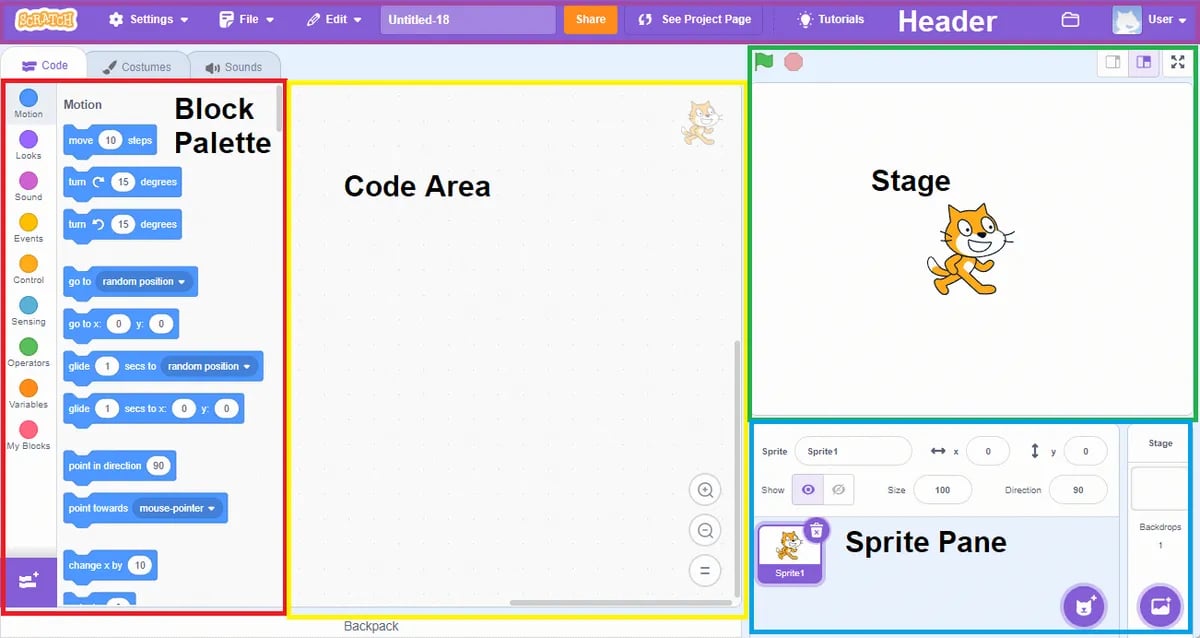
In Scratch, every instruction is a coloured block with short text, like "move 10 steps" or "say Hello". Kids drag and arrange these blocks to form a program. Because nothing is typed, children never hit the syntax errors that frustrate so many beginners, and they can read their own program at a glance.
This approach lets kids focus on logic and creativity instead of memorising syntax. The concept is called block-based visual programming and has become the standard for kids' coding intros in over 40 countries, including school curricula in the UK, Estonia, and Finland. That is why Scratch is usually the first step before children learn algorithms and text languages like Python. Algonova teachers in Indonesia follow the same order, opening the free 60 minute masterclass with a Scratch project the child finishes live.
Scratch was first released in May 2007 by the Lifelong Kindergarten Group at MIT Media Lab, led by professor Mitchel Resnick. The project was funded by the National Science Foundation (NSF), Intel Foundation, and LEGO Foundation — with a mission to shift how children interact with technology: from mere consumers to creators.
Three major versions have been released:
In 2014, a joint team from Tufts University and MIT Media Lab launched ScratchJr — a version for pre-readers aged 5–7, a tablet app with wordless blocks. Today the Scratch community has over 90 million registered users, 100 million projects, and is available in 70+ languages including Bahasa Indonesia.
Scratch lets kids create real projects they can play and share right away:
Every project is built from sprites (characters/objects), backdrops (backgrounds), costumes (sprite appearance variants), and scripts (sets of blocks that control a sprite's behaviour). Kids can add cloud variables to build multi-player projects.
The global Scratch community lets children view others' projects, remix (modify someone's work), and share their own — learning from each other safely. This is called remix culture and is one of the most powerful learning features in Scratch.
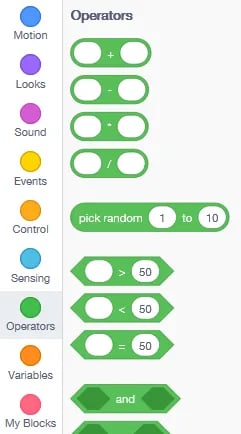
The Scratch 3.0 editor groups all blocks into 9 colour-coded categories that kids can easily tell apart:
There are two versions matched to a child's age:
| ScratchJr | Scratch | |
|---|---|---|
| Age | 5–7 years | 8–16 years |
| Form | Tablet app (iOS/Android/Kindle) | Browser/desktop |
| Block language | Wordless (icons only) | Blocks with short words |
| Reading | No reading needed | Basic reading needed |
| Output | Simple animations & stories | Games & complex projects (variables, loops, cloud) |
| Cloud/online | No (offline) | Yes (can upload projects to scratch.mit.edu) |
For kindergarten-age kids (5–7), download the free ScratchJr app on the App Store or Google Play. Scratch runs smoothly even on a second-hand laptop or a tablet with 2GB RAM — no expensive device required.
Understand the concepts behind Scratch with the Algonova Coding Glossary: what is programming, Blockly, variable, loop, function, and computational thinking. See every term in the Coding & Technology Glossary for Kids.
Scratch opens the door to coding for children: they build real games before they ever feel that programming is hard.
Bayu Nugraha, Children's Coding Specialist
Though it looks like play, Scratch teaches real skills proven to influence cognitive and creative development:
Technically, Scratch teaches block-based programming with a drag-and-drop interface — each concept below is identical to those used in Python, JavaScript, or C++:
That's why a child who masters Scratch has a strong foundation to move to text languages like Python. The popular fork Snap! (developed at UC Berkeley) extends Scratch with deeper computer-science concepts (first-class functions, lambda) — often used in universities.
Scratch is adopted in curricula in over 40 countries and is the main tool in MIT's ScratchEd teacher community and Google's CS First programme. Primary/junior high teachers in Indonesia can use Scratch for:
Scratch Foundation (the non-profit that has managed Scratch since 2013) provides free curriculum guides at scratch.mit.edu/educators. Teachers can also create a Teacher Account to manage classes of up to 40 students with a dedicated dashboard.
For Indonesian kids without stable internet, Scratch Desktop — a free offline version — is available. Install steps:
.sb3 files; they can be moved via USB and uploaded to an online account later when internet is available.Scratch 1.4 (a legacy 2009 version) is also available for very old computers or under 1GB RAM, though features are limited.
In English, "scratch" means making something from zero. The name fits because kids build projects from the start by stacking blocks instead of copying ready-made code. So when someone asks "what is Scratch" or "what does Scratch mean", the short answer is the same: a free visual programming language from MIT for kids aged 8-16. Children use it to build games and animations while learning coding logic. Many parents first meet Scratch through Algonova's kids coding course, which uses Scratch as the starting material.
Kids just starting out can try these simple projects:
Each Scratch project above can be finished in 15-30 minutes and shared with friends right away.
There are three ways to use Scratch depending on your needs:
Every version is free, so downloading Scratch never requires payment. If your child wants to learn with a teacher's guidance, parents can try a free coding class for 60 minutes before deciding.
Scratch is designed for kids aged 8-16, while ScratchJr suits children aged 5-7 who cannot read fluently yet. Primary kids usually start with simple games and animations, then move up to variables and cloud variables in junior high. What matters is that the child can use a mouse or touchscreen and recognise block colours and shapes.
Scratch is a block-based visual programming language developed by the MIT Media Lab (Lifelong Kindergarten Group) since 2007 under Mitchel Resnick's leadership. Scratch is designed specifically for children aged 8-16 to learn coding by drag-and-drop of colourful blocks — no typing required. Kids can build games, animations, interactive stories, and science simulations directly in the browser at scratch.mit.edu, free of charge, no install needed.
The word "scratches" in English means marks or grooves (plural of scratch). However, in the kids' programming context, the reference is to Scratch — the name of MIT Media Lab's visual coding platform, not the common noun. The Scratch name was chosen because of the "scratching" philosophy — mixing code blocks like a DJ mixes vinyl records — emphasising remix and creativity.
In AI and programming contexts, the phrase "from scratch" means building something from nothing without pre-built libraries or templates — e.g. "training an AI model from scratch" means starting from raw data with no pre-trained model. This differs from Scratch (capital S), which is the name of MIT's kids' coding platform. Interestingly, Scratch 3.0 also provides basic AI extensions like text-to-speech, translate, and video sensing to introduce AI concepts to children.
Learning Scratch gives kids 6 main benefits: (1) computational thinking — breaking problems into systematic steps, (2) creative confidence — confidence to create and experiment, (3) sequential logic & debugging — patiently tracking errors, (4) cross-subject integration — math via variables, storytelling via animation, (5) collaboration via Scratch community remix culture, and (6) transition foundation to Python, JavaScript, or other text languages. Loop, condition, and variable concepts in Scratch are identical to professional languages.
Scratch is designed for children aged 8-16 who can read basic text. For younger kids (5-7 / pre-reader), ScratchJr is available — a tablet version with wordless icon-only blocks. After age 12+, kids are usually ready for advanced Scratch projects with cloud variables and lists. Kids 15-16 are typically ready to transition to text languages like Python.
ScratchJr for children 5-7 is a tablet app (iOS, Android, Kindle) with wordless blocks — icon-only, suitable for pre-readers. Scratch for children 8-16 runs in the browser/desktop with short-word blocks, supports complex projects (variables, lists, cloud variables) and an online community. ScratchJr focuses on simple animations; Scratch enables multi-player games and science simulations.
Scratch is 100% free and open source. Just open scratch.mit.edu in a browser — no payment, no install, no ads, no in-app purchases. ScratchJr for tablets is also free on the App Store and Google Play. Scratch is developed as a non-profit project by the Scratch Foundation (established 2013) and funded by NSF, Intel Foundation, and LEGO Foundation — so it will always remain free for kids worldwide.
First Scratch projects for kid beginners are typically: (1) Moving cat — Motion + Events blocks, (2) Interactive quiz — Ask and If/Then, (3) Catch-the-object game — falling sprite and left-right button, (4) 2-character story — dialogue with Say + Wait blocks, (5) Dance party animation — costumes switching to music, and (6) Simple calculator — variables + operators. Each project can be finished in 30-60 minutes and ended by sharing to the community.
After 1-2 years mastering Scratch (typically at age 10-14), kids are usually ready to move to Python — the text language most used in the AI and data-science industry. Because loop, condition, variable, and function concepts are already mastered in Scratch, the transition feels smooth. Other alternatives: JavaScript (web development), Java/C++ (coding competitions), or Snap! (UC Berkeley's Scratch fork with deeper computer-science concepts).
The main Scratch version (at scratch.mit.edu) requires basic reading ability because blocks contain short words like "move" or "if". For children who cannot read yet (age 5-7), ScratchJr is available — a tablet app with wordless blocks, only colourful icons that are visually easy to understand. ScratchJr was designed by Tufts University + MIT Media Lab for pre-readers and can be used independently by kindergarten kids with light parent guidance.
Yes, Scratch has an official offline version called Scratch Desktop downloadable free at scratch.mit.edu/download. It supports Windows 10+, macOS 10.13+, ChromeOS, and Android tablet. After install (~150 MB), Scratch Desktop runs fully without internet — perfect for Indonesian kids in areas with limited connections. Projects are saved locally as `.sb3` files and can be moved via USB, then uploaded to an online account later.
Yes — Scratch is designed so kids can learn independently through built-in tutorials at scratch.mit.edu (click "Tutorials" on the menu). There are also Scratch Wiki and thousands of remixable projects to learn from. However, with teacher guidance (either online or offline), kids typically progress faster because they get direct feedback, tiered challenges, and structured learning. At Algonova Indonesia, Scratch classes run weekly in 1-on-1 private, a mini-group of 2–4, or a group of up to 10 students with certified teachers — first trial class is free.
For readers who want to go deeper — Scratch 1.0 (2007) was written in Squeak, a modern dialect of Smalltalk developed by Alan Kay at Xerox PARC. Smalltalk's "object + message" philosophy fits Scratch's sprite concept perfectly (each sprite is an independent object receiving messages).
Several notable forks grew from this base:
Scratch is an ideal starting point, but kids are usually ready to level up after 1–2 years of consistent learning. A common transition path:
The transition feels smooth because the concepts (loops, conditions, variables, events) are already mastered in Scratch; only how they are written changes — from block to text.
Want your child to learn Scratch with a teacher's guidance? Try a free Master Class at Algonova — a 60-minute session, at no cost, no credit card. Perfect for primary, junior high, and senior high kids starting coding from zero.
Once you understand what Scratch is, here are the next steps to try:

Algonova worldwide
Contact
Whatsapp: +62 21 50996971
Email: info@algonova.id
Address
Coworking Area, Gedung IT 6 Lantai Dasar, Nongsa Digital Park, Jalan Hang Lekiu, Kelurahan Sambau, Kecamatan Nongsa, Batam, Indonesia Directorate General of Consumer Protection and Trade Compliance – Ministry of Trade of the Republic of Indonesia. WhatsApp Ditjen PKTN: 0853-1111-1010.
PT Algonova Indonesia Cerdas All rights reserved 2026