Future careers in the AI era: what to prepare now
AI Education8 min
AI Education

Arif Pratama
Web & AI Instructor
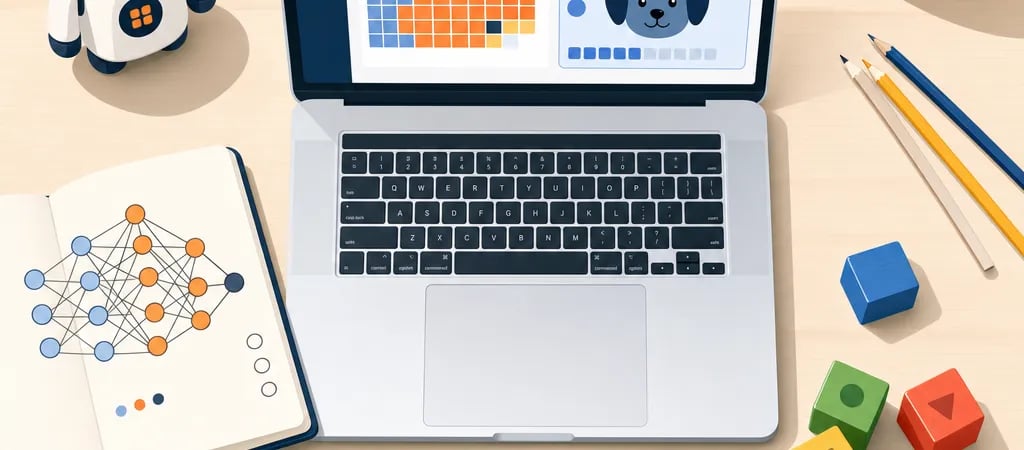
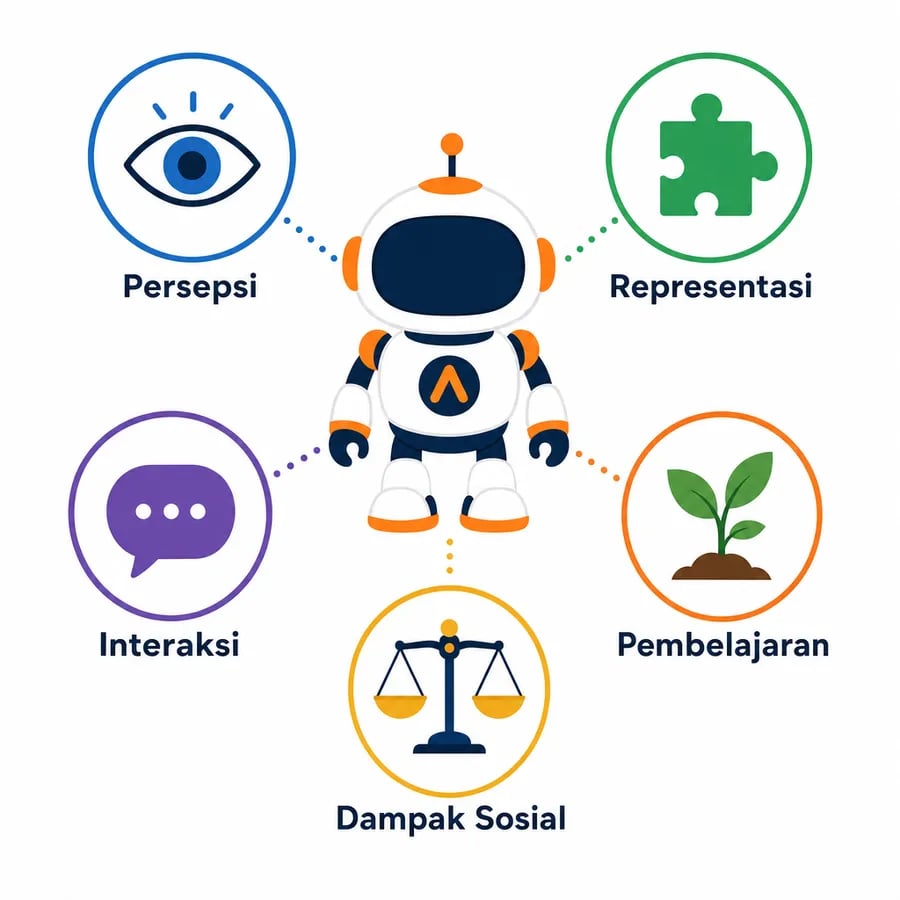
Elementary school kids can start learning AI as early as grade 1 through the AI4K12 five big ideas: perception, representation, learning, natural interaction, and societal impact. Grades 1–2 focus on unplugged concept play; grades 3–4 move into Google's Teachable Machine (2019); grades 5–6 build projects with Scratch AI Extensions (MIT Media Lab) and Machine Learning for Kids (Dale Lane, IBM). The whole track fits in 2–3 hours per week, all core tools are free, and it aligns with Indonesia's Kurikulum Merdeka Informatika curriculum (Kemendikbudristek, 2022).
Algonova is an online coding, math, AI, and design school for kids ages 5–17, with 1,000,000+ alumni across 97 countries since 2016. Classes are live with certified teachers in Private (1 student), Mini (2-4 students), and Group (up to 10 students) formats — not pre-recorded videos.
The AI4K12 framework — a joint AAAI and CSTA initiative launched in 2018 — defines the five big ideas every child should understand about AI, and all five can be simplified down to grade-1 level. They are: perception, representation & reasoning, learning, natural interaction, and societal impact.
1. Perception. AI "sees" and "hears" through sensors. For elementary kids: the phone camera that recognizes faces, or a voice assistant that catches the word "hello." Grade-1 activity: close eyes, guess an object by its sound — that's how a computer learns sound too.
2. Representation and Reasoning. Computers store knowledge as numbers and patterns. For grade 3: draw a simple decision tree — "Does this animal have fur? → Yes → Does it feed milk? → Yes → Mammal."
3. Learning. AI learns from examples, not from manually written rules. Analogy: how a child learns to tell cats from dogs — not from a dictionary, but from seeing hundreds of examples. This is the core idea of machine learning.
4. Natural Interaction. AI communicates through language, gestures, and images. Examples: a chatbot that responds to greetings, or a real-time translation app. Grade-4 activity: build a simple greeting chatbot in Scratch.
5. Societal Impact. AI can help (translate languages, spot diseases) but it can also be wrong and biased. Grades 5–6 are ready to discuss: "If an AI is only trained on photos of white-furred dogs, will it recognize a black dog?"
These five ideas are the compass — whatever tool the child uses (Teachable Machine, ChatGPT, App Inventor), the activity should map to at least one of the five.
The progression is layered: grades 1–2 unplugged, grades 3–4 Teachable Machine, grades 5–6 Scratch AI and Machine Learning for Kids projects. Don't start with coding — start with the concept. UNESCO's AI Competency Framework for Students (2024) makes the same point: AI literacy comes before technical skills.
Grades 1–2 (ages 6–8) — Pattern and sensor intro, no screens. Activities: guess an object by its sound with eyes closed, sort cards by color pattern, play "paper ChatGPT" — one child writes a question, another answers with random flash cards. Focus: perception and natural interaction. Zero screen time.
Grades 3–4 (ages 8–10) — Google Teachable Machine (2019). Browser-based, free, no account required. A child trains an image classifier in 15 minutes: class 1 = cat photos (10 shots), class 2 = dog photos (10 shots), click "Train Model," test live with the webcam. At this point the child has touched big ideas #1 (perception) and #3 (learning). Doubles as a Scratch bridge.
Grades 5–6 (ages 10–12) — Scratch AI Extensions + Machine Learning for Kids. Scratch AI Extensions (MIT Media Lab) adds speech-to-text, text-to-speech, and Teachable Machine integration to classic Scratch. Machine Learning for Kids (Dale Lane, IBM, 2017) adds a more structured layer for training text/image/number models. At this level a child can build real projects: a greeting chatbot, an animal-recognition webcam, or a game that adapts to a player's face.
For strongly motivated kids, MIT App Inventor (David Wolber and Hal Abelson, MIT, 2010) is workable by grade 6 — kids build simple Android apps with AI components (image recognition, text classifier). It's the doorway to secondary school.
An elementary kid doesn't need to be a programmer to understand AI. What they need are five questions: how does AI see, how does AI store knowledge, how does AI learn from examples, how does AI interact, and what's its impact on other people. If they can answer all five with concrete examples, they're literate.
Arif Pratama, Web & AI Instructor at Algonova
Indonesia's Kurikulum Merdeka Informatika (Kemendikbudristek, 2022) introduces "algorithms and programming" starting phase A (grades 1–2), progressing through phase B (grades 3–4) and phase C (grades 5–6). The word "AI" isn't explicit in the elementary syllabus, but phase C content includes "computer systems that make decisions based on data" — that's the ML entry door.
Mapping:
This also aligns with Jeannette Wing's Computational Thinking (Carnegie Mellon, 2006), a global reference for digital curricula — problem decomposition, pattern recognition, abstraction, algorithmic thinking. All four pillars are exercised when a child trains an AI model.
AI and coding get conflated, but the difference is clean: coding teaches a child to write instructions for the computer, AI teaches a child to teach the computer to learn from examples. Coding is rule-based ("if X, do Y"); AI is example-based ("here are 100 cat photos, figure it out"). Elementary kids should meet both, but the learning paths differ.
If your child is more drawn to the coding-foundations side (Scratch, basic Python, logic puzzles), read our guide on coding material for elementary kids — it covers the Scratch → Python → project sequence. And if you're still asking "why start in elementary?" our benefits of coding for elementary kids piece rounds up cognitive and academic upside.
For workforce context: the World Economic Forum Future of Jobs Report 2025 lists "AI and big data" as the fastest-growing skill for 2025–2030. But for an elementary schooler, the goal is not "become an AI engineer" — it's honest AI literacy: understand how it works, understand its limits, don't be afraid and don't be over-impressed.
These five projects map directly to the AI4K12 five big ideas, each finishes in 60–90 minutes, and every core tool is free with no subscription. Sequence them from easiest to most challenging.
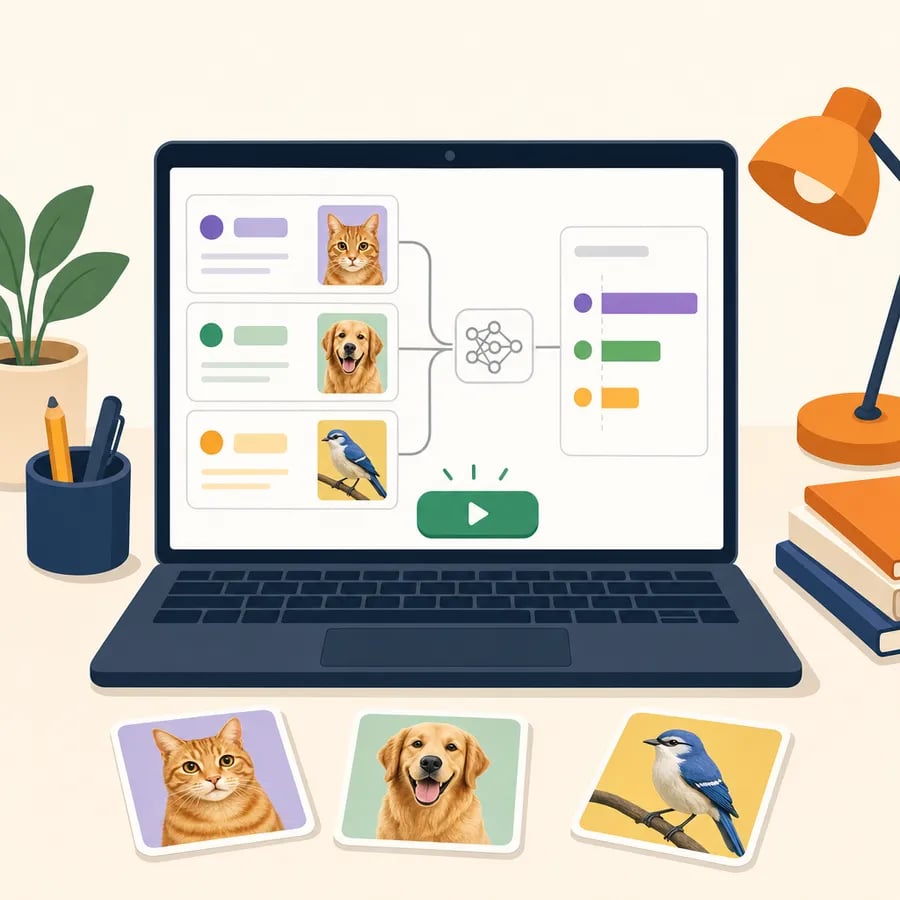
1. Animal image classifier (grades 3–4, Teachable Machine). Kid grabs 10–15 pet photos via the laptop camera, trains 2–3 classes (cat/dog/bird), tests live. Goal: understand that AI learns from examples — few examples = bad results. 60-minute session.
2. Simple greeting chatbot (grades 4–5, Scratch AI Extensions). Kid builds a sprite that listens through the mic and replies "hello" on a greeting word. Concepts exercised: natural interaction, speech-to-text. For a deeper cut, use Machine Learning for Kids to train a 3–5 intent text classifier (greeting, weather question, song request). 60–90 minutes.
3. Music AI with Scratch (grade 5, Scratch Music Extensions). Kid teaches Scratch to play different notes based on the color the webcam detects. This combines perception (camera) with reasoning (color → note rules). 90 minutes.
4. Text-to-image with a supervised image-gen tool (grade 6, supervised). Use a kid-safe browser tool (not general Midjourney). Google's ImageFX and similar tools available through structured classes work with parent/teacher supervision. Discussion focus: why is the output sometimes "weird"? This is the entry to big idea #5 (societal impact and hallucination).
5. Symptom-diagnosis decision tree with Machine Learning for Kids (grade 6). Kid trains a text classifier that maps simple symptoms ("I have a cough," "runny nose," "headache") into categories ("flu / allergy / migraine"). Then discuss: what if the AI gets the diagnosis wrong? This is a mini-version of what the Elements of AI course from the University of Helsinki and Reaktor teaches at scale — probabilistic reasoning for the general public.
For all five, parents need no technical background. Written docs for Teachable Machine and Machine Learning for Kids are enough — but because the goal is reasoning and discussion (not just clearing a tutorial), a teacher or a group class adds real value.
Ideal cadence: 2–3 hours per week, split into two 60–90 minute sessions — a total of 12 weeks covers the five AI4K12 ideas lightly. Not rigid; Code.org's AI 101 module recommends 6 hours total for an intro, while Elements of AI (aimed at teens/adults) targets 30 hours. For elementary schoolers, 2–3 hours a week is right.
Free tools, no account:
Tools that need an account or a minimum age:
Signals it's time to stop and take a break: the child is frustrated because the AI is "wrong" three times in a row, or the child is over-trusting the AI's answer without any checking. Both are teachable moments about AI's limits — surface them as discussion, don't force the tool.
Elementary kids can start learning AI through simple concepts like patterns, data, and how a computer makes decisions, long before touching complex programming. The foundation is coding logic, which is why many kids begin with Scratch before understanding AI more deeply, in line with Kurikulum Merdeka. To introduce AI and coding in a guided way with a teacher, see the programs on the coding classes page, or try a free coding class so your child starts at the right level through a diagnostic session.
A child can start learning AI as early as grade 1 (age 6), but not through coding — through unplugged concepts. Grades 1–2 focus on perception and pattern: guess an object by its sound with eyes closed, sort cards by color pattern, or play 'paper ChatGPT' with flash cards. Grades 3–4 move to Teachable Machine in the browser, about 15 minutes per session. Grades 5–6 can build Scratch AI or Machine Learning for Kids projects. Because Teachable Machine only asks a child to collect examples and press train, a first animal image classifier can be finished in a single short session with no prior coding experience. The key is matching the tool to the age, not fast-forwarding into ChatGPT or Python.
Learning AI and learning coding are different, though related. Coding trains a child to write step-by-step instructions for the computer ('if X, do Y'). AI trains a child to teach the computer to learn from examples — the child doesn't write rules, the child gathers data. Example: to build a cat recognizer with classical coding, the child has to describe a cat using rules (four legs, tail, whiskers) that easily fail. With AI, the child just provides 20 cat photos and Teachable Machine learns on its own. Ideally an elementary schooler meets both, but the paths differ: coding through Scratch and basic Python, AI through Teachable Machine and Scratch AI Extensions. For the coding-path detail, see our post on coding material for elementary kids.
AI4K12 is a joint initiative from AAAI (Association for the Advancement of Artificial Intelligence) and CSTA (Computer Science Teachers Association), launched in 2018 to define what K–12 kids should learn about AI. It produced five big ideas: perception, representation and reasoning, learning, natural interaction, and societal impact. These five matter because they act as a compass — whatever tool the child uses (Teachable Machine, Scratch AI, ChatGPT, App Inventor), the activity maps to at least one big idea. This prevents AI learning from becoming 'just playing with tools' with no conceptual grip. Full AI4K12 guidelines are free at ai4k12.org and have been adopted by many school curricula worldwide.
The ideal cadence for elementary schoolers is about 3 hours per week, split into two 90-minute sessions. At this pace, all five AI4K12 ideas can be covered in about 12 weeks. This matches Code.org's recommended 6 total hours for the AI 101 intro module. A schedule you can use: Saturday morning 90 minutes on a Teachable Machine project, Wednesday afternoon 90 minutes on concept discussion or continued Scratch AI. Don't exceed 4 hours per week at elementary level — kids need time to digest concepts, not just finish more tutorials. If the child asks for more, shift to offline projects: draw diagrams, play pattern-guessing games, or read stories about how AI works.
Elementary kids should not use ChatGPT unsupervised. OpenAI's Terms of Use set a minimum age of 13, and 18 without parental consent. Beyond terms, ChatGPT is a poor AI-learning tool for elementary schoolers because the interface is too 'magical' — the child sees the answer but not the learning process. Better fits for elementary are Teachable Machine, Scratch AI Extensions, and Machine Learning for Kids because they show the training process explicitly: the child gathers data, clicks train, sees results. If a parent wants to introduce ChatGPT to a grade-6 kid, do it with full supervision: use the parent's account, sit together, and discuss hallucinations and limits after each response.
Kurikulum Merdeka Informatika (Kemendikbudristek, 2022) introduces 'algorithms and programming' starting phase A (grades 1–2), progressing through phase B (grades 3–4), and phase C (grades 5–6). The word 'AI' isn't explicit in the elementary syllabus, but phase C content includes 'computer systems that make decisions based on data' — the entry door to machine learning. Practical mapping: phase A pairs with unplugged AI activities (patterns, sound guessing), phase B with Teachable Machine and basic Scratch, phase C with Scratch AI Extensions plus bias-and-ethics discussion. Teachers and parents can use the AI4K12 five big ideas as an additional frame that fills the 'AI gap' in the official syllabus. Full curriculum guidelines are available on the Kemendikbud official site.
There are four core free tools for learning AI at home with no paid account required. First, Google Teachable Machine (2019) — open a browser, no install, no account. Fits grades 3–6. Second, Scratch AI Extensions from MIT Media Lab — account optional, adds AI blocks to classic Scratch. Fits grades 4–6. Third, Machine Learning for Kids (Dale Lane, IBM, 2017) — optional free IBM Cloud account, adds a more structured training layer. Fits grades 5–6. Fourth, Code.org AI 101 module — browser, no account, conceptual intro. Fits grades 5–6. For strongly motivated grade-6 kids, add MIT App Inventor (free, Google account required) to build Android apps with AI components.
A parent needs no technical background to guide an elementary schooler through AI — what's needed is opening five discussion questions after every session. Core questions: what does this AI 'see' or 'hear' (perception), how does the AI store its knowledge (representation), what examples did it learn from (learning), how does the child interact with it (interaction), and who could be harmed if the AI is wrong (societal impact). If these five are discussed routinely, the child's AI literacy will develop past just finishing tutorials. If you want more support, a group class with a certified teacher helps a lot — an Algonova free 60-minute Master Class is a good starting point to see what productive AI discussion looks like.

Algonova worldwide
Contact
Whatsapp: +62 21 50996971
Email: info@algonova.id
Address
Coworking Area, Gedung IT 6 Lantai Dasar, Nongsa Digital Park, Jalan Hang Lekiu, Kelurahan Sambau, Kecamatan Nongsa, Batam, Indonesia Directorate General of Consumer Protection and Trade Compliance – Ministry of Trade of the Republic of Indonesia. WhatsApp Ditjen PKTN: 0853-1111-1010.
PT Algonova Indonesia Cerdas All rights reserved 2026